
Lesson guide
Learning objectives
- Explain the main purpose of Static properties and methods in JavaScript.
- Identify the syntax, APIs, or concepts introduced in this lesson.
- Use the examples to predict how JavaScript will behave before you run similar code.
- Connect this topic to nearby lessons in Classes.
Real-world context
This lesson matters when you need to recognize where Static properties and methods fits into real JavaScript programs. We can also assign a method to the class as a whole.
Key ideas
- Static properties and methods is part of the Classes chapter, so it builds on the surrounding concepts rather than standing alone.
- Read each code example in two passes: first for the result, then for the rule that explains the result.
- When a section compares similar features, focus on the condition that makes you choose one feature over another.
Key terms
- Static properties and methods
- Static
- properties
- methods
- Classes
We can also assign a method to the class as a whole. Such methods are called static.
In a class declaration, they are prepended by static keyword, like this:
class User {
  static staticMethod() {
    alert(this === User);
  }
}

User.staticMethod();
That actually does the same as assigning it as a property directly:
class User { }

User.staticMethod = function() {
  alert(this === User);
};

User.staticMethod(); // true
The value of this in User.staticMethod() call is the class constructor User itself (the “object before dot” rule).
Usually, static methods are used to implement functions that belong to the class as a whole, but not to any particular object of it.
For instance, we have Article objects and need a function to compare them.
A natural solution would be to add Article.compare static method:
class Article {
  constructor(title, date) {
    this.title = title;
    this.date = date;
  }

  static compare(articleA, articleB) {
    return articleA.date - articleB.date;
  }
}

// usage
let articles = [
  new Article("HTML", new Date(2019, 1, 1)),
  new Article("CSS", new Date(2019, 0, 1)),
  new Article("JavaScript", new Date(2019, 11, 1))
];

articles.sort(Article.compare);

alert( articles[0].title ); // CSS
Here Article.compare method stands “above” articles, as a means to compare them. It’s not a method of an article, but rather of the whole class.
Another example would be a so-called “factory” method.
Let’s say, we need multiple ways to create an article:
- Create by given parameters (
title,dateetc). - Create an empty article with today’s date.
- …or else somehow.
The first way can be implemented by the constructor. And for the second one we can make a static method of the class.
Such as Article.createTodays() here:
class Article {
  constructor(title, date) {
    this.title = title;
    this.date = date;
  }

  static createTodays() {
    // remember, this = Article
    return new this("Today's digest", new Date());
  }
}

let article = Article.createTodays();

alert( article.title ); // Today's digest
Now every time we need to create a today’s digest, we can call Article.createTodays(). Once again, that’s not a method of an article, but a method of the whole class.
Static methods are also used in database-related classes to search/save/remove entries from the database, like this:
// assuming Article is a special class for managing articles
// static method to remove the article by id:
Article.remove({id: 12345});
Static methods aren’t available for individual objects
Static methods are callable on classes, not on individual objects.
E.g. such code won’t work:
// ...
article.createTodays(); /// Error: article.createTodays is not a function
Static properties
A recent addition
This is a recent addition to the language. Examples work in the recent Chrome.
Static properties are also possible, they look like regular class properties, but prepended by static:
class Article {
  static publisher = "Ilya Kantor";
}

alert( Article.publisher ); // Ilya Kantor
That is the same as a direct assignment to Article:
Article.publisher = "Ilya Kantor";
Inheritance of static properties and methods
Static properties and methods are inherited.
For instance, Animal.compare and Animal.planet in the code below are inherited and accessible as Rabbit.compare and Rabbit.planet:
class Animal {
  static planet = "Earth";

  constructor(name, speed) {
    this.speed = speed;
    this.name = name;
  }

  run(speed = 0) {
    this.speed += speed;
    alert(`${this.name} runs with speed ${this.speed}.`);
  }

  static compare(animalA, animalB) {
    return animalA.speed - animalB.speed;
  }

}

// Inherit from Animal
class Rabbit extends Animal {
  hide() {
    alert(`${this.name} hides!`);
  }
}

let rabbits = [
  new Rabbit("White Rabbit", 10),
  new Rabbit("Black Rabbit", 5)
];

rabbits.sort(Rabbit.compare);

rabbits[0].run(); // Black Rabbit runs with speed 5.

alert(Rabbit.planet); // Earth
Now when we call Rabbit.compare, the inherited Animal.compare will be called.
How does it work? Again, using prototypes. As you might have already guessed, extends gives Rabbit the [[Prototype]] reference to Animal.
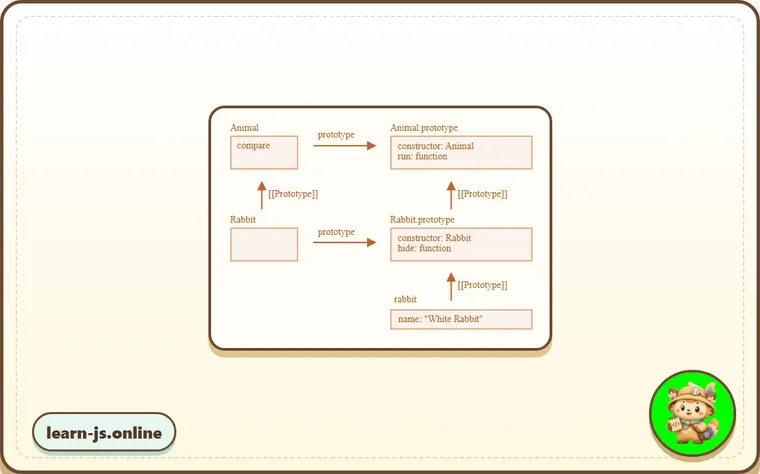
So, Rabbit extends Animal creates two [[Prototype]] references:
Rabbitfunction prototypally inherits fromAnimalfunction.Rabbit.prototypeprototypally inherits fromAnimal.prototype.
As a result, inheritance works both for regular and static methods.
Here, let’s check that by code:
class Animal {}
class Rabbit extends Animal {}

// for statics
alert(Rabbit.__proto__ === Animal); // true

// for regular methods
alert(Rabbit.prototype.__proto__ === Animal.prototype); // true
Common mistakes
- Skipping the small examples and then missing the exact rule that Static properties and methods depends on.
- Copying code without changing one value at a time to see which part controls the result.
- Treating similar-looking syntax or APIs as interchangeable before checking their edge cases.
Summary
Static methods are used for the functionality that belongs to the class “as a whole”. It doesn’t relate to a concrete class instance.
For example, a method for comparison Article.compare(article1, article2) or a factory method Article.createTodays().
They are labeled by the word static in class declaration.
Static properties are used when we’d like to store class-level data, also not bound to an instance.
The syntax is:
class MyClass {
  static property = ...;

  static method() {
    ...
  }
}
Technically, static declaration is the same as assigning to the class itself:
MyClass.property = ...
MyClass.method = ...
Static properties and methods are inherited.
For class B extends A the prototype of the class B itself points to A: B.[[Prototype]] = A. So if a field is not found in B, the search continues in A.
Predict
Before running this static-methods check, predict the six output lines. It separates class-level functionality from instance methods and checks static inheritance.
Reveal explanation
The output is CSS, learn-js.online, true, 2020-01-01, undefined, and true. Article.compare belongs to the class itself, so it can be passed to sort without creating an article instance. publisher is also stored on the class, not on each article. NewsArticle inherits the static factory createToday; inside that static method, this is the class it was called on, so it creates a NewsArticle. Static methods are not instance methods, so digest.createToday is undefined. extends links the constructor functions too, so NewsArticle inherits statics from Article.
Try it
Call Article.createToday("Daily") instead of NewsArticle.createToday("Daily"), then predict the third output line.
Practice
- Rewrite one example from this lesson without looking at the original, then run it and compare the result.
- Change one input, operator, method call, or option in a code sample and predict what will happen before running it.
- Explain Static properties and methods in your own words as if you were reviewing it with another learner.
Keep learning
Continue with Private and protected properties and methods when you are ready for the next lesson.