
Lesson guide
Learning objectives
- Explain the main purpose of Browser environment, specs in JavaScript.
- Identify the syntax, APIs, or concepts introduced in this lesson.
- Use the examples to predict how JavaScript will behave before you run similar code.
- Connect this topic to nearby lessons in Document.
Real-world context
This lesson matters when you need to recognize where Browser environment, specs fits into real JavaScript programs. The JavaScript language was initially created for web browsers.
Key ideas
- Browser environment, specs is part of the Document chapter, so it builds on the surrounding concepts rather than standing alone.
- Read each code example in two passes: first for the result, then for the rule that explains the result.
- When a section compares similar features, focus on the condition that makes you choose one feature over another.
Key terms
- Browser environment, specs
- Browser
- environment
- specs
- Document
The JavaScript language was initially created for web browsers. Since then, it has evolved into a language with many uses and platforms.
A platform may be a browser, or a web-server or another host, or even a “smart” coffee machine if it can run JavaScript. Each of these provides platform-specific functionality. The JavaScript specification calls that a host environment.
A host environment provides its own objects and functions in addition to the language core. Web browsers give a means to control web pages. Node.js provides server-side features, and so on.
Here’s a bird’s-eye view of what we have when JavaScript runs in a web browser:
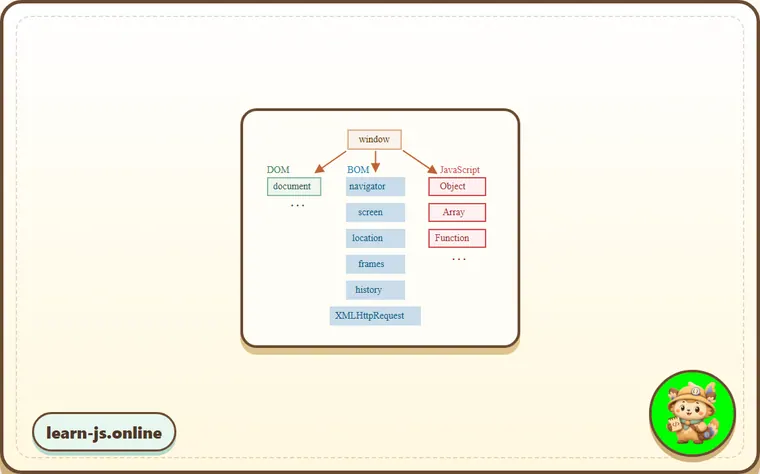
There’s a “root” object called window. It has two roles:
- First, it is a global object for JavaScript code, as described in the chapter Global object.
- Second, it represents the “browser window” and provides methods to control it.
For instance, we can use it as a global object:
function sayHi() {
  alert("Hello");
}

// global functions are methods of the global object:
window.sayHi();
And we can use it as a browser window, to show the window height:
alert(window.innerHeight); // inner window height
There are more window-specific methods and properties, which we’ll cover later.
DOM (Document Object Model)
The Document Object Model, or DOM for short, represents all page content as objects that can be modified.
The document object is the main “entry point” to the page. We can change or create anything on the page using it.
For instance:
// change the background color to red
document.body.style.background = "red";

// change it back after 1 second
setTimeout(() => document.body.style.background = "", 1000);
Here, we used document.body.style, but there’s much, much more. Properties and methods are described in the specification: DOM Living Standard.
DOM is not only for browsers
The DOM specification explains the structure of a document and provides objects to manipulate it. There are non-browser instruments that use DOM too.
For instance, server-side scripts that download HTML pages and process them can also use the DOM. They may support only a part of the specification though.
CSSOM for styling
There’s also a separate specification, CSS Object Model (CSSOM) for CSS rules and stylesheets, that explains how they are represented as objects, and how to read and write them.
The CSSOM is used together with the DOM when we modify style rules for the document. In practice though, the CSSOM is rarely required, because we rarely need to modify CSS rules from JavaScript (usually we just add/remove CSS classes, not modify their CSS rules), but that’s also possible.
BOM (Browser Object Model)
The Browser Object Model (BOM) represents additional objects provided by the browser (host environment) for working with everything except the document.
For instance:
- The navigator object provides background information about the browser and the operating system. There are many properties, but the two most widely known are:
navigator.userAgent– about the current browser, andnavigator.platform– about the platform (can help to differentiate between Windows/Linux/Mac etc). - The location object allows us to read the current URL and can redirect the browser to a new one.
Here’s how we can use the location object:
alert(location.href); // shows current URL
if (confirm("Go to Wikipedia?")) {
  location.href = "https://wikipedia.org"; // redirect the browser to another URL
}
The functions alert/confirm/prompt are also a part of the BOM: they are not directly related to the document, but represent pure browser methods for communicating with the user.
Specifications
The BOM is a part of the general HTML specification.
Yes, you heard that right. The HTML spec at https://html.spec.whatwg.org is not only about the “HTML language” (tags, attributes), but also covers a bunch of objects, methods, and browser-specific DOM extensions. That’s “HTML in broad terms”. Also, some parts have additional specs listed at https://spec.whatwg.org.
Common mistakes
- Skipping the small examples and then missing the exact rule that Browser environment, specs depends on.
- Copying code without changing one value at a time to see which part controls the result.
- Treating similar-looking syntax or APIs as interchangeable before checking their edge cases.
Summary
Talking about standards, we have:
DOM specificationDescribes the document structure, manipulations, and events, see https://dom.spec.whatwg.org.CSSOM specificationDescribes stylesheets and style rules, manipulations with them, and their binding to documents, see https://www.w3.org/TR/cssom-1/.HTML specificationDescribes the HTML language (e.g. tags) and also the BOM (browser object model) – various browser functions: setTimeout, alert, location and so on, see https://html.spec.whatwg.org. It takes the DOM specification and extends it with many additional properties and methods.
Additionally, some classes are described separately at https://spec.whatwg.org/.
Please note these links, as there’s so much to learn that it’s impossible to cover everything and remember it all.
When you’d like to read about a property or a method, the Mozilla manual at https://developer.mozilla.org/en-US/ is also a nice resource, but the corresponding spec may be better: it’s more complex and longer to read, but will make your fundamental knowledge sound and complete.
To find something, it’s often convenient to use an internet search “WHATWG [term]” or “MDN [term]”, e.g https://google.com?q=whatwg+localstorage, https://google.com?q=mdn+localstorage.
Now, we’ll get down to learning the DOM, because the document plays the central role in the UI.
Predict
Before running this browser-environment check, predict the four output lines. It separates the JavaScript global object role, DOM document access, BOM URL access, and the standards named in the lesson.
Reveal explanation
The output is alert:Hello, red, true, and DOM | CSSOM | HTML/BOM. The example models the browser host environment rather than the JavaScript language core. window can act as the global object, so sayHi is reachable there. document.body.style represents DOM/CSSOM-style page manipulation. window.location.href is a BOM-style browser object for the current URL. The final line names the three standards the lesson separates: DOM for document structure, CSSOM for styles, and HTML/BOM for browser-specific objects.
Try it
Change location.href to a different domain, then predict why only the boolean line changes.
Practice
- Rewrite one example from this lesson without looking at the original, then run it and compare the result.
- Change one input, operator, method call, or option in a code sample and predict what will happen before running it.
- Explain Browser environment, specs in your own words as if you were reviewing it with another learner.
Keep learning
Continue with DOM tree when you are ready for the next lesson.