
Lesson guide
Learning objectives
- Explain the main purpose of Microtasks in JavaScript.
- Identify the syntax, APIs, or concepts introduced in this lesson.
- Use the examples to predict how JavaScript will behave before you run similar code.
- Connect this topic to nearby lessons in Promises, async/await.
Real-world context
This lesson matters when you need to recognize where Microtasks fits into real JavaScript programs. Promise handlers // are always asynchronous.
Key ideas
- Microtasks is part of the Promises, async/await chapter, so it builds on the surrounding concepts rather than standing alone.
- Read each code example in two passes: first for the result, then for the rule that explains the result.
- When a section compares similar features, focus on the condition that makes you choose one feature over another.
Key terms
- Microtasks
- Promises, async/await
- JavaScript
Promise handlers .then/.catch/.finally are always asynchronous.
Even when a Promise is immediately resolved, the code on the lines below.then/.catch/.finally will still execute before these handlers.
Here’s a demo:
let promise = Promise.resolve();

promise.then(() => alert("promise done!"));

alert("code finished");
If you run it, you see code finished first, and then promise done!.
That’s strange, because the promise is definitely done from the beginning.
Why did the .then trigger afterwards? What’s going on?
Microtasks queue
Asynchronous tasks need proper management. For that, the ECMA standard specifies an internal queue PromiseJobs, more often referred to as the “microtask queue” (V8 term).
As stated in the specification:
- The queue is first-in-first-out: tasks enqueued first are run first.
- Execution of a task is initiated only when nothing else is running.
Or, to put it more simply, when a promise is ready, its .then/catch/finally handlers are put into the queue; they are not executed yet. When the JavaScript engine becomes free from the current code, it takes a task from the queue and executes it.
That’s why “code finished” in the example above shows first.
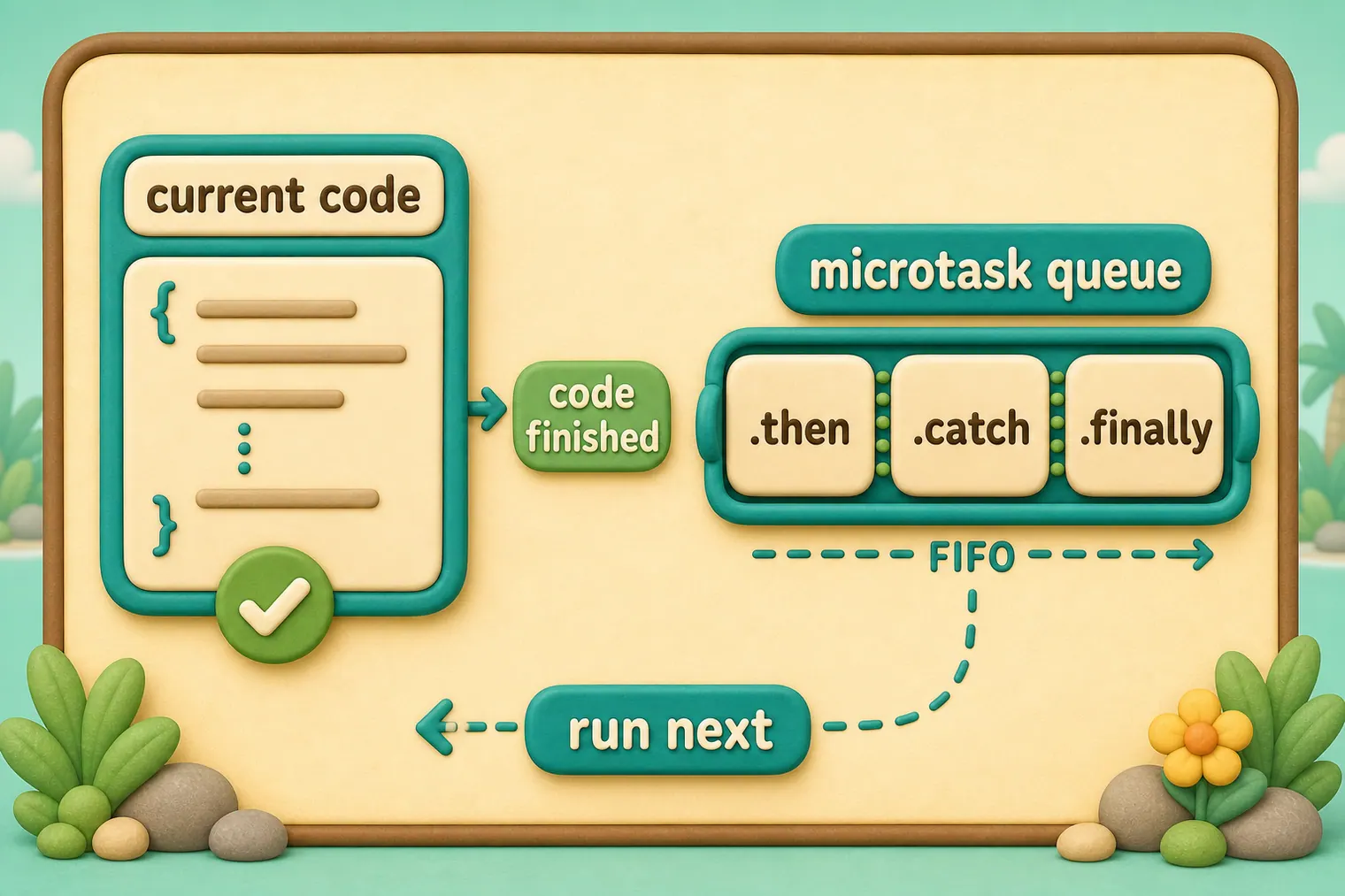
Promise handlers always go through this internal queue.
If there’s a chain with multiple .then/catch/finally, then every one of them is executed asynchronously. That is, it first gets queued, then executed when the current code is complete and previously queued handlers are finished.
What if the order matters for us? How can we make code finished appear after promise done?
Easy, just put it into the queue with .then:
Promise.resolve()
  .then(() => alert("promise done!"))
  .then(() => alert("code finished"));
Now the order is as intended.
Unhandled rejection
Remember the unhandledrejection event from the article Error handling with promises?
Now we can see exactly how JavaScript finds out that there was an unhandled rejection.
An “unhandled rejection” occurs when a promise error is not handled at the end of the microtask queue.
Normally, if we expect an error, we add .catch to the promise chain to handle it:
let promise = Promise.reject(new Error("Promise Failed!"));
promise.catch(err => alert('caught'));

// doesn't run: error handled
window.addEventListener('unhandledrejection', event => alert(event.reason));
But if we forget to add .catch, then, after the microtask queue is empty, the engine triggers the event:
let promise = Promise.reject(new Error("Promise Failed!"));

// Promise Failed!
window.addEventListener('unhandledrejection', event => alert(event.reason));
What if we handle the error later? Like this:
let promise = Promise.reject(new Error("Promise Failed!"));
setTimeout(() => promise.catch(err => alert('caught')), 1000);

// Error: Promise Failed!
window.addEventListener('unhandledrejection', event => alert(event.reason));
Now, if we run it, we’ll see Promise Failed! first and then caught.
If we didn’t know about the microtasks queue, we could wonder: “Why did unhandledrejection handler run? We did catch and handle the error!”
But now we understand that unhandledrejection is generated when the microtask queue is complete: the engine examines promises and, if any of them is in the “rejected” state, then the event triggers.
In the example above, .catch added by setTimeout also triggers. But it does so later, after unhandledrejection has already occurred, so it doesn’t change anything.
Common mistakes
- Skipping the small examples and then missing the exact rule that Microtasks depends on.
- Copying code without changing one value at a time to see which part controls the result.
- Treating similar-looking syntax or APIs as interchangeable before checking their edge cases.
Summary
Promise handling is always asynchronous, as all promise actions pass through the internal “promise jobs” queue, also called “microtask queue” (V8 term).
So .then/catch/finally handlers are always called after the current code is finished.
If we need to guarantee that a piece of code is executed after .then/catch/finally, we can add it into a chained .then call.
In most Javascript engines, including browsers and Node.js, the concept of microtasks is closely tied with the “event loop” and “macrotasks”. As these have no direct relation to promises, they are covered in another part of the tutorial, in the article Event loop: microtasks and macrotasks.
Predict
Before running this microtask check, predict the six output lines. It shows that promise handlers run after the current script, in queue order, and before a timer task.
Reveal explanation
The output is script start, script end, microtask 1, catch:handled, microtask 2, and timeout. Promise handlers never interrupt the currently running script, so both synchronous logs happen first. The first .then and the .catch are queued as microtasks; the second .then can only be queued after the first .then has run. The timer callback is a later task, so it runs after the microtask queue is empty.
Try it
Move console.log("script end") into another .then(...), then predict why it moves before timeout but after earlier queued promise handlers.
Practice
- Rewrite one example from this lesson without looking at the original, then run it and compare the result.
- Change one input, operator, method call, or option in a code sample and predict what will happen before running it.
- Explain Microtasks in your own words as if you were reviewing it with another learner.
Keep learning
Continue with Async/await when you are ready for the next lesson.